← Back to all cases
HoReCa · restaurant chain

Accounting for a restaurant chain on AppSheet + Google Sheets — no in-house developer

A 15+ point restaurant chain used to live in notebooks, Excel files and group chats. We built a single accounting system on AppSheet + Google Sheets + Apps Script: every location runs its shift from a phone, all data flows into one sheet, the daily report self-arrives in the owner's Telegram. No in-house backend developer — maintained by a single data engineer.

screen
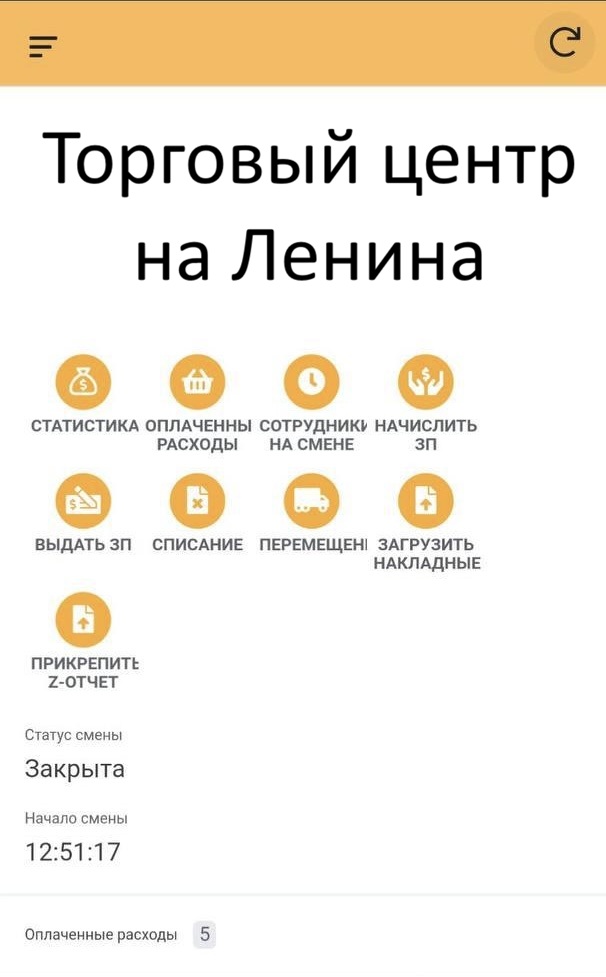
Mobile shift dashboard in the AppSheet app
— what it looks like

Open your shift in your pocket — see the whole day

At the location, a staff member opens the AppSheet app on a regular smartphone and lands on the active-shift dashboard. From there — big icons for every action: statistics, paid expenses, staff on shift, payroll accrual and payout, write-offs, inter-point transfers, invoice uploads, Z-report attachment. What needs to be done today sits on one screen. And the key part: AppSheet is cross-platform. The same app runs on iOS, Android and in the browser from a single schema. No separate iPhone / Android build, no App Store / Google Play publishing.
screen
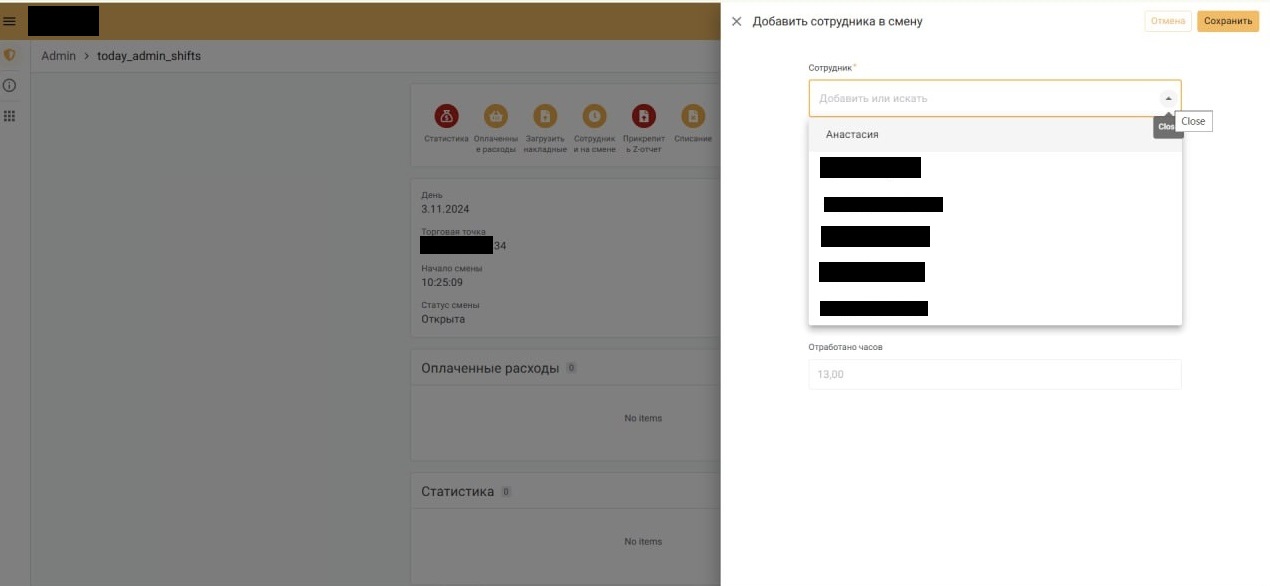
Shift card with the «add employee» panel
screen
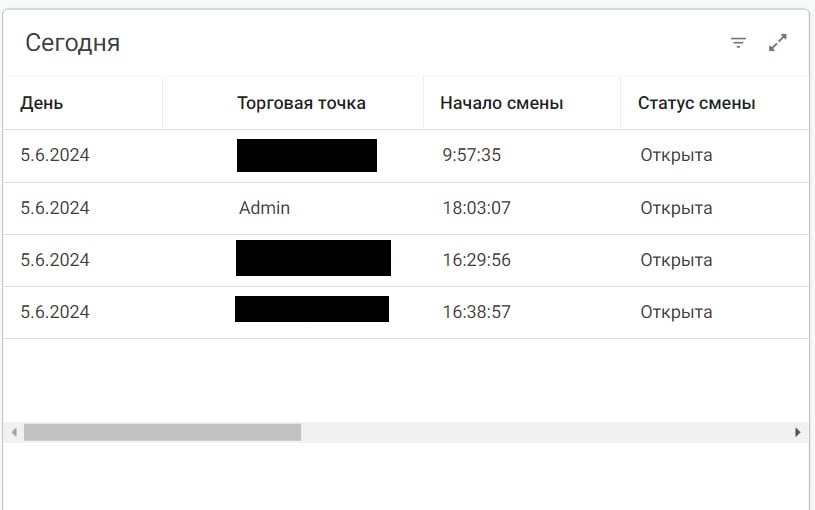
Table of active shifts across the chain for today
screen
Detailed shift view with expenses and income

The owner's admin — in a browser

The same data the location enters, the owner reads from anywhere through AppSheet web. On the left — the per-shift card (day, point, opening time, status). In the centre — the expanded view with operational actions and expense/income tables. On the right — the «Today» table with active shifts across the chain: one row per open location.

What hurt

  • Every location ran its own Excel or paper notebook — by month-end the numbers across locations didn't match.
  • To pull a daily report, the owner had to call each point, ask for cash-register photos and invoices, and stitch it together manually.
  • Payroll was calculated on a pocket calculator from shifts — constant mistakes and disputes with staff.
  • Z-reports got lost. Invoices arrived in one chat, receipts in another, nothing was tied to a specific shift.
  • Everyone had the same level of access. A line employee could see the entire chain's payroll, an accountant could accidentally edit the product catalogue.
  • Any catalogue change (a new product, a new supplier) had to be DM'd to whoever owned the main file.
  • Commissioning a full-blown CRM from scratch — too expensive and too slow for a chain that's still growing.

What we did

  • One cross-platform AppSheet app for the entire chain — runs on iOS, Android and in the browser from a single schema. No separate per-platform development and no App Store / Google Play publishing.
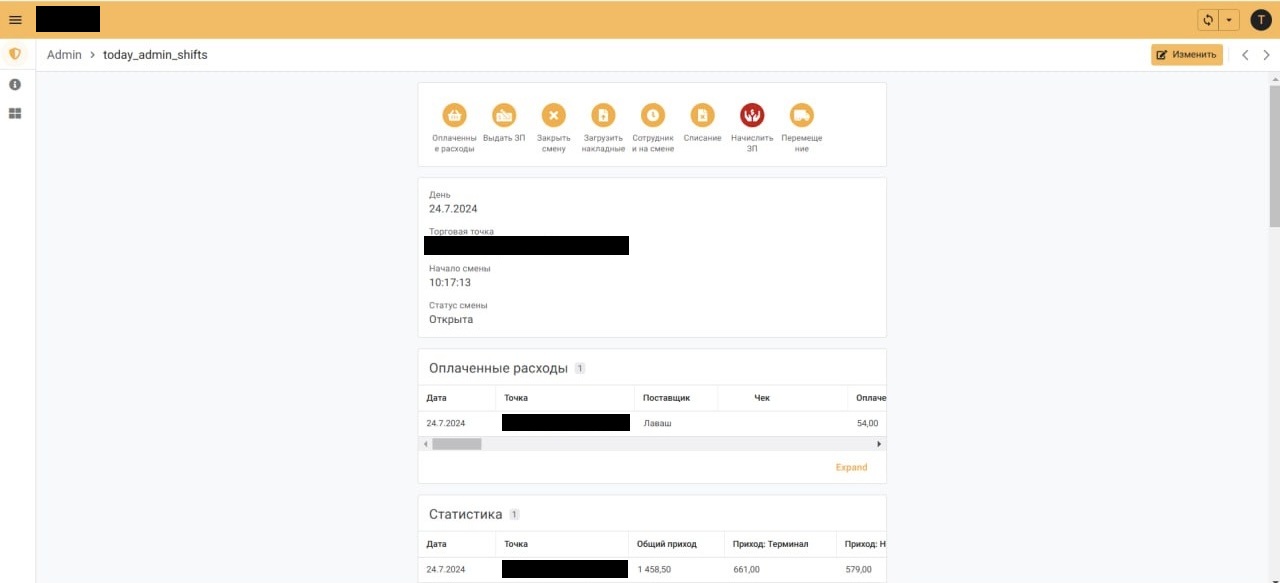
  • Every point's processes live in the app: open shift → attach the Z-report → record expenses and income → pay out salaries → close shift.
  • Under the hood — one Google Sheet with 20+ tabs: shifts, points, employees, expenses, income, suppliers, items, invoices, transfers, accruals, payouts, action log.
  • Apps Script aggregates the daily report per location and sends it to the owner in Telegram — no human in the loop.
  • 5 access levels: the owner sees everything, the chain director — all locations, a point manager — only their own location, a cashier — only the current shift, an accountant — only accruals and payouts. Implemented through AppSheet security filters.
  • Payroll is computed automatically: shift × hours worked × rate → monthly statement in one click.
  • All catalogues (items, suppliers, points, roles) are edited in the same Google Sheet — no app release.
  • A Z-report is a photo in Google Drive linked to the shift row. Same for invoices. No separate storage.
  • Inter-point transfers are paired rows: one location writes off, the other receives. The chain's balance reconciles itself.
  • No in-house developer. One data engineer checks the logs once a week, fixes formulas and ships new modules on demand.

What it delivered

15+

points in one system

The chain grows — adding a point takes 10 minutes: one row in the catalogue plus access grants.

0 min

on the daily report

At end of day, Apps Script computes the digest and pushes it to the owner's Telegram.

5

access levels

Owner, chain director, point manager, cashier, accountant — each sees only what's theirs.

1

data engineer instead of a team

No in-house backend developer: maintenance and growth — a few hours a week.

What we built

  1. 01

    Shift accounting

    Opening, closing, status, linkage to a point and to employees, Z-report attachment (photo).

  2. 02

    Expense accounting

    Paid expenses with item & supplier catalogues, units (pcs / kg / l), receipt photos.

  3. 03

    Income accounting

    Cash, terminal, cash-on-delivery — per shift, automatically rolled into the daily stats.

  4. 04

    Payroll: accrual & payout

    Hours × rate from the shift → statement; payouts logged as a separate operation linked to the employee.

  5. 05

    Write-offs

    A dedicated module with reason (spoilage, breakage, shortage) and the employee on shift.

  6. 06

    Inter-point transfers

    Paired rows: one point gives, the other receives. Chain balance reconciles without manual entry.

  7. 07

    Invoice uploads

    Attach the invoice photo to the income row — search later by supplier and date.

  8. 08

    Catalogues

    Items, suppliers, expense categories, points, roles and rates — all editable in Google Sheets, no release.

  9. 09

    Access levels

    5 roles, row filters in AppSheet by USEREMAIL() and point — each user sees only their own.

  10. 10

    Telegram report broadcasts

    Morning report: which shifts are open across the chain. Evening: income, expenses, balance per point.

  11. 11

    Summary reporting

    Dashboards in Sheets via QUERY() and SUMIFS() — revenue, expenses and payroll across points and periods.

  12. 12

    Action log

    Every change is written into a dedicated tab with author, time and old value — disputes resolve in a minute.
screen
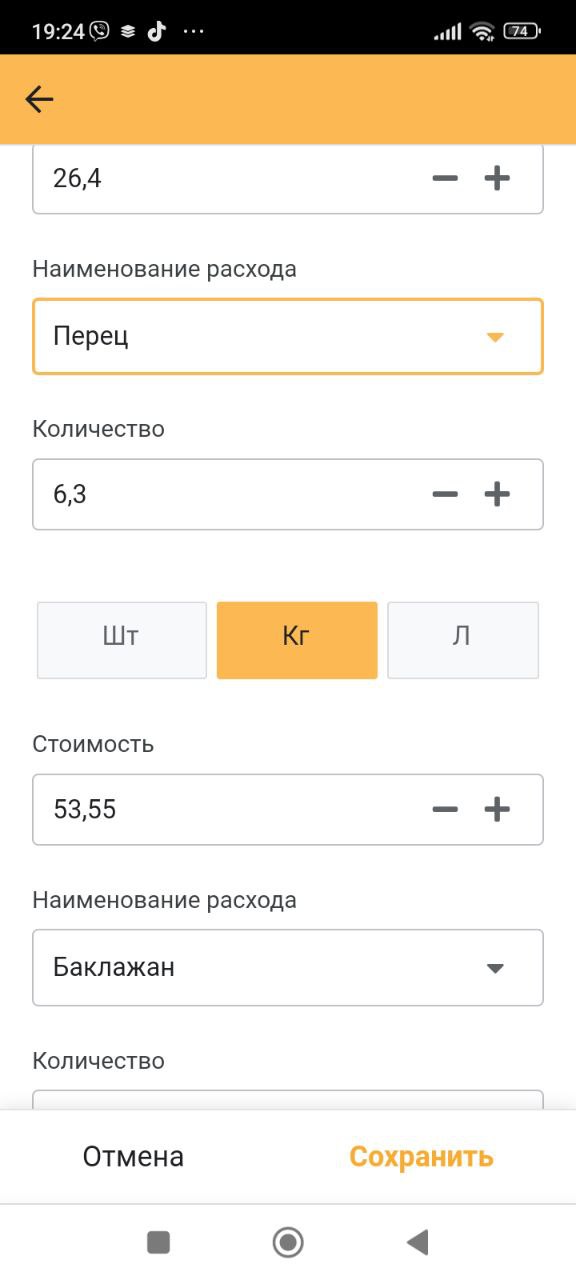
Add-expense form — item, quantity, unit, cost
screen
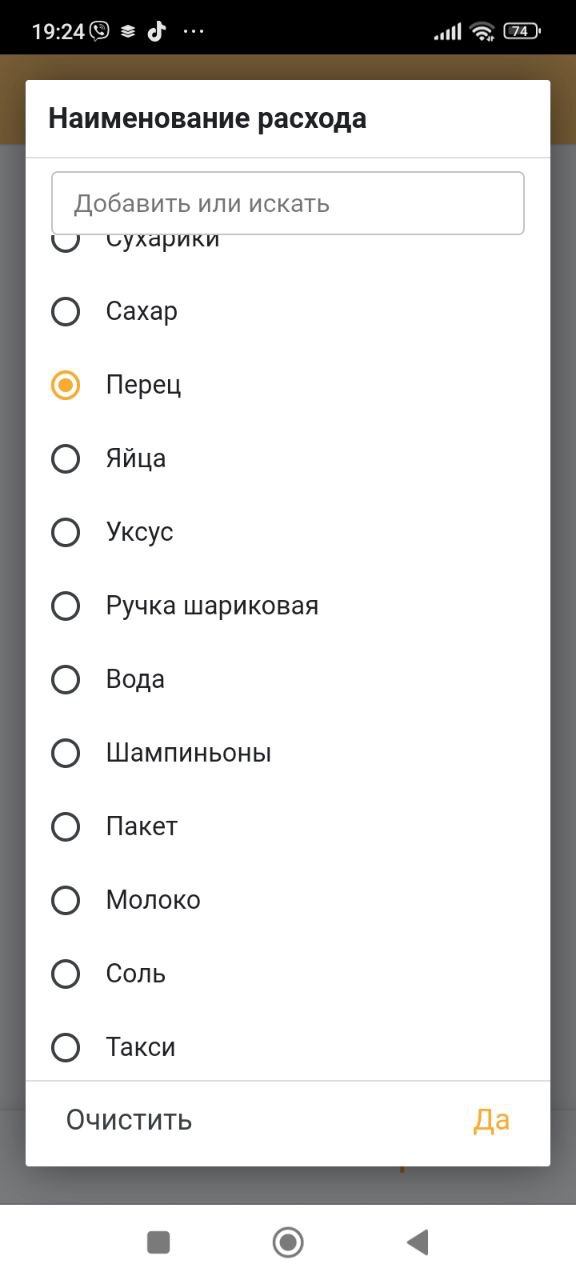
Expense-name catalogue — pick an item
screen
Supplier catalogue — pick a category

Floor staff enter data in a single tap

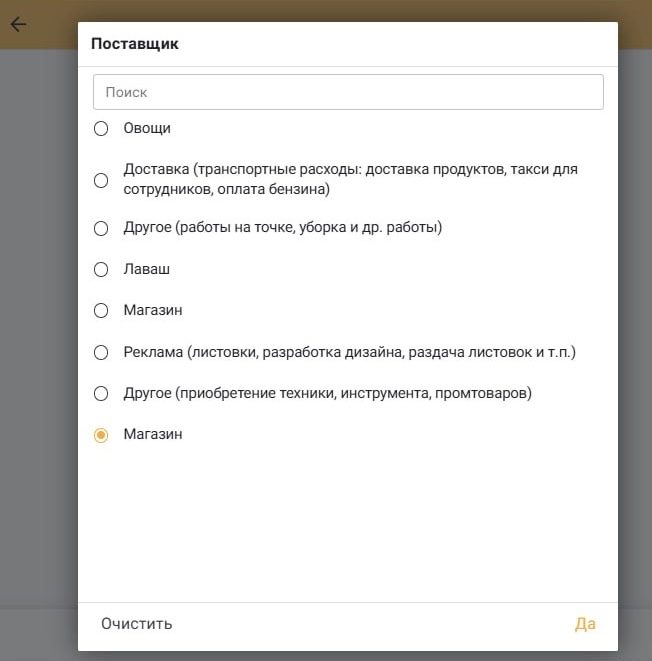
The on-site staff member opens «Paid expenses», picks an item from the catalogue (sugar, pepper, eggs, milk, mushrooms…), enters the amount and unit (pcs / kg / l), picks a supplier (veggies, lavash, store, delivery, advertising…) and saves. Linking to the open shift and the point — automatic, no manual entry. The same flow — for income, invoices, write-offs and inter-point transfers.

— a similar project for you

Want an accounting system for your chain — with no in-house developer?

We'll build the accounting system for your chain on AppSheet + Google Sheets + Apps Script: a mobile app for the points, Telegram reports, multi-level access. Tell us what you need — we'll come back with architecture and a cost estimate in a couple of days.

AppSheet + Sheets-as-DB + Apps Script: a HoReCa chain accounting system without a backend team — Corexy